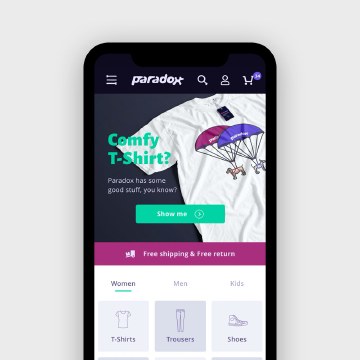
In brief
E-commerce design connects discovery, comparison, product confidence, cart review, and checkout. A good store helps people choose the right item and understand the total commitment before asking them to pay.

Common tools
- Figma
- Browser tools
- Spreadsheet
Skills in play
- Research
- Systems thinking
- User testing
What it is
An e-commerce experience helps people discover, evaluate, and buy products or services. It combines catalogue organisation, search, product information, visual presentation, cart logic, payment, delivery, and support. The visual design matters because it can make products appealing, but its deeper job is to reduce uncertainty about what is being bought and what will happen next.
Not every visitor is ready to purchase. Some are exploring a category, comparing options, checking compatibility, or returning to a known item. Design should support those modes without pushing everyone through the same promotional funnel. E-commerce adds the particular burden of choice and transaction to the broader website system.
Organise the catalogue around decisions
Define product types, attributes, variants, bundles, availability, and relationships before drawing cards. A merchant’s internal inventory structure may not match how shoppers think. Learn the terms customers use and the criteria they need to compare. Categories should be predictable; search and filters should expose attributes that genuinely help narrow a choice.
Test discovery with specific tasks: find an item for a defined need, compare two similar products, and recover when the first search fails. Do not make every result card a miniature product page. Show the information needed for the next decision—name, image, price, key variant or constraint—and provide a clear path to deeper detail.
Make product pages answer real questions
Show the product honestly
Use images that reveal form, scale, material, and important details. Include views or demonstrations that answer common doubts, not only flattering hero shots. If colour or finish is a selection criterion, present variations clearly and explain where screen rendering may differ from the physical item. For complex products, diagrams or comparison tables can help more than extra lifestyle imagery.
Write useful names and descriptions. Explain who the product is for, what is included, what varies, and what the buyer should check before ordering. Availability, delivery information, returns, and important restrictions should be easy to find before checkout. A polished page that hides a decisive condition is not good product communication.
Make variants and actions unambiguous
Show which size, colour, configuration, or quantity is selected. Do not rely on colour alone to communicate the state. Explain unavailable options rather than making them disappear without context. After “Add to cart,” confirm what was added and offer a clear next step without trapping the shopper in an overlay.
The cart should support review. People need to recognise the chosen item and variant, change quantity or remove something, and understand charges before committing. Cross-sells may be useful when relevant, but they should not obscure the order summary or the path forward.
Design checkout for completion
Ask only for information needed to fulfil the order and explain unfamiliar requests. Label fields clearly, mark required and optional inputs, and show specific error messages near the problem. Preserve entered information when a correction is needed. Baymard’s checkout research documents how avoidable account and form friction can interrupt purchases; use such findings as prompts for testing your own audience rather than as a substitute for it.
Make totals, delivery choices, taxes or fees, and the final action understandable before payment. Offer a straightforward guest route where the business model permits it. State what happens after purchase and provide a useful confirmation with order details and support information. The end of checkout is the start of fulfilment, not the end of the experience.
Test for trust and inclusion
Try the journey on a narrow screen, with a keyboard, at increased text size, and with slow or interrupted loading. Check search, filters, variant selection, cart editing, forms, and error recovery. Use the accessibility guide to evaluate the whole interaction, not only visual contrast.
Review customer questions and returns alongside conversion data. A high click-through rate can coexist with poor understanding and costly mistakes. Compare what people thought they ordered with what actually arrived. Improve product information and selection controls when the same confusion recurs.
Practical checks
- Can people find a product using the language and criteria they naturally use?
- Do product images and copy answer the doubts that block a decision?
- Are chosen variants, price, availability, and delivery conditions clear?
- Can users edit and recover from errors without losing their work?
- Does the order confirmation explain what happens next?
Common mistake
Optimising the store only for the moment of purchase. A trustworthy shopping experience helps someone make the right choice and feel confident after the transaction too.
People and practice