In brief
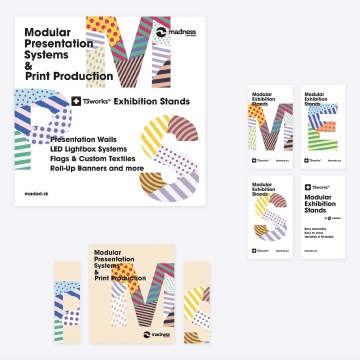
A visual identity system is a set of connected decisions about type, colour, imagery, composition, and behaviour. It helps different teams make new work that feels like one brand without repeating the same layout everywhere.

Common tools
- Adobe Illustrator
- Figma
- Adobe InDesign
Skills in play
- Systems thinking
- Concept development
- Typography
What it is
A visual identity system translates an organisation’s position and personality into repeatable design decisions. A logo can identify the source, but the broader system determines how a web page, campaign, report, sign, and social post belong together. The useful question is not “do these pieces look identical?” but “can someone recognise the same point of view across different situations?”
The system needs both constants and room to respond. Too few rules make every application feel unrelated. Too many produce a rigid template that cannot handle a new format or message. A strong identity defines which elements carry recognition and which can change with the audience, medium, or moment.
Start with the communication job
Map the touchpoints before choosing colours. Who creates them, how often do they change, and where will they be seen? An identity for a cultural festival may need expressive posters and motion, while a public service needs plain-language documents and reliable navigation. Both may use the same ingredients, but they require different levels of variation and control.
Collect real content: short and long names, headlines, data, images of mixed quality, calls to action, and legal copy. Design a small set of representative applications, including the awkward ones. A system tested only on a perfect poster tends to break when someone has to make a form, a presentation, or a narrow mobile banner.
Build the visual grammar
Recognition anchors
Identify the elements that should remain stable: perhaps a distinctive type treatment, a colour relationship, a shape language, an image crop, or a compositional rule. Avoid making every element equally loud. Choose a few anchors that work independently, so recognition does not depend on the logo appearing at a large size.
Record what an anchor does, not just what it looks like. For example, a bright field may frame an announcement, while a quiet neutral surface supports long reading. That distinction makes future decisions easier than a page of colour swatches alone.
Flexible components
Define type scales, spacing, grids, image treatments, icon behaviour, and reusable layout patterns. Show how they adapt across large and small formats. Include accessibility checks for text contrast and legibility; a lively brand colour may be effective as a surface but unsuitable for small type.
Create variations deliberately. A campaign may be more expressive than a help page, yet both should share enough structure to feel related. Treat variation as a controlled range rather than an exception requested each time.
Voice in motion and space
An identity also appears in transitions, video, packaging, and environments. Describe what movement feels like—fast or calm, elastic or precise—and how graphic elements behave when space is limited. Test physical constraints such as substrate, lighting, viewing distance, and production method instead of assuming a screen mock-up predicts the result.
Test the system, not a hero image
Make a stress-test board with at least six unlike uses: a landing page, mobile card, poster, presentation slide, document, and a small mark application. Use ordinary content and realistic production limitations. Ask another designer to make one additional piece using only the draft rules. The places where they hesitate expose missing decisions.
Look for both coherence and failure. If everything depends on one artwork, the identity may be a campaign rather than a system. If every piece looks mechanically identical, it may need a clearer hierarchy of fixed and flexible elements.
Deliver and maintain it
Deliver working templates, assets, tokens or specifications where useful, and short examples of good decisions. Name files clearly and establish ownership: who approves new components, where master assets live, and how changes are recorded. A concise, usable guide beats a beautiful PDF that nobody can apply.
Review the system after real work has passed through it. Gather examples of repeated workarounds, inaccessible combinations, and missing formats. Update the rules with reasons and examples, while preserving the recognition anchors that have begun to build familiarity.
Common mistake
Confusing consistency with sameness. A visual identity is successful when it gives different messages a shared character, not when every page uses one composition. Define the logic behind the look, then let the logic work.
People and practice